
Heating & Cooling
Overview
Stay comfortable year-round with individually controlled HVAC split units designed to automatically adjust for optimal comfort.
Quick Start (Recommended Settings)
For the best experience, we recommend the following settings:
Mode: Smart
Heat / Cool: Automatic
Temperature: 71°F – 76°F
Fan: Auto
We promise—you’ll stay perfectly comfortable with these settings.
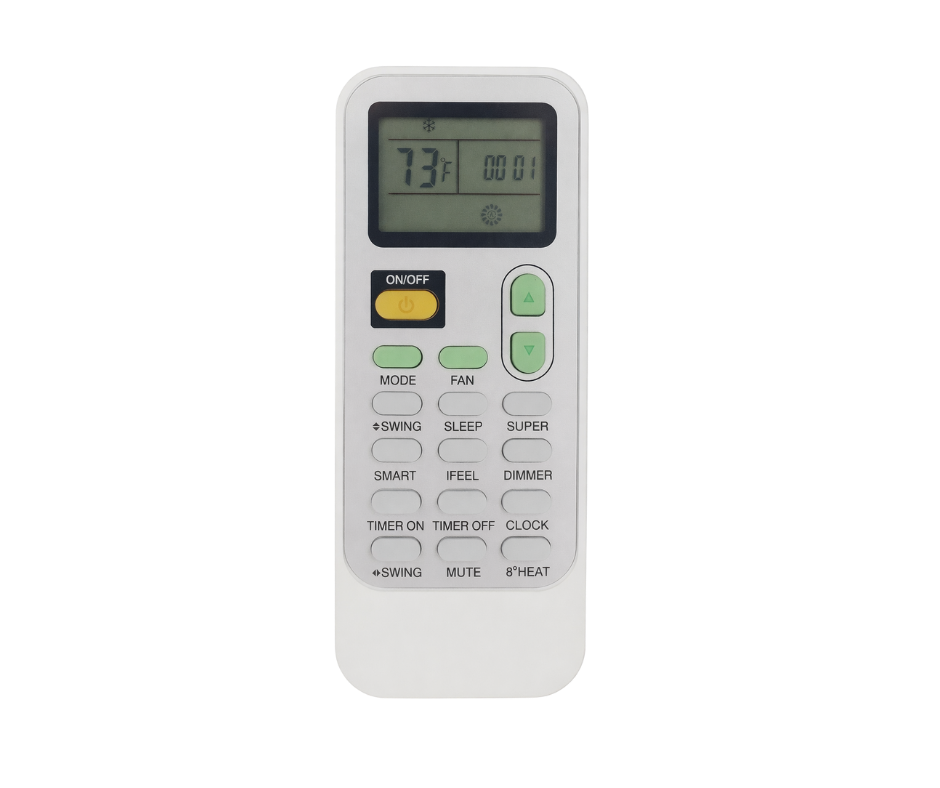
*This image shows the remote used to control the heating and cooling system.How to use the remote
Use the remote control to turn the unit on, adjust the temperature, or change modes.
For most guests, Smart Mode with Fan set to Auto works best and requires no further adjustment.
Remote Button Guide
Here’s a simple overview of the most commonly used buttons:
Power – Turns the unit on or off
Mode – Switches between heating, cooling, fan, or dry
Fan – Adjusts fan speed or sets it to Auto
Temperature ▲ / ▼ – Raises or lowers the temperature
Smart – Automatically adjusts for maximum comfort
Sleep – Runs the system quietly
Swing / Direction – Adjusts airflow direction
Other buttons are available but typically not needed for everyday use.
Helpful Tips
Allow a few minutes for the system to adjust after changing settings
Keep doors and windows closed for best performance
Avoid frequent setting changes—Smart Mode works best when left alone
Need Help?
If the system doesn’t respond or you’re unsure which setting to use, please message us anytime, and we’ll be happy to help.